How to find OpenGL version
Posted: 02 May 2023 12:08 pm | Last updated: 03 May 2023
Requirements:
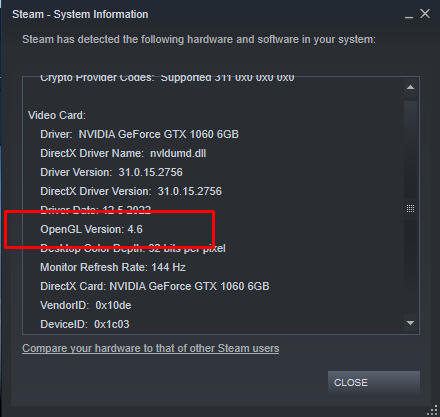
The easiest way I have found to find your current version of OpenGL is to use the Steam Client. Other options are available, but this is the only quick way I found without downloading a (100%) virus.
To find your current version of OpenGL follow these steps:
- Open Steam
- At the top left click Help
- In the dropdown click System Information
- In the window that appears scroll down until you see Video Card and find OpenGL Version
If you believe any content in this article is incorrect please let us know.
Include the link to this article with information as to what could be changed.
Contact Us